Terraria server hosting in Brussels
Vanilla, TShock or tModLoader, your pick on every plan. Your world stays up when the host logs off. From €4.99 a month.



Prices include VAT, no commitment. −5% quarterly, −10% half-yearly, −15% yearly. You pick vanilla, TShock or tModLoader when you order, and moving up a plan keeps your world and files.

Why OnPowered for your Terraria server?
When you host from the game, the world stops as soon as the host quits. On a server it stays up: one of you farms the Jungle at 2 a.m., another finishes the Wall of Flesh arena the next day.
Three plans named after the ores in the game, from copper to luminite. All three versions run on each of them, with the Pterodactyl panel and DDoS protection included.
Vanilla, TShock or tModLoader: which one?
You pick the version when you order. The three don't mix: a regular Terraria player can't join a tModLoader server, and tModLoader keeps mod data in a separate .twld file that vanilla ignores.
| Vanilla | TShock | tModLoader | |
|---|---|---|---|
| What it does | Re-Logic's official server, Terraria 1.4.5 with nothing added | The same vanilla with accounts, groups and permissions, anti-cheat, server-side characters, protected regions, commands like /tp, /ban, /region | The mod loader: Calamity, Thorium, Fargo's Souls, Magic Storage and the rest of the Workshop |
| Version (October 2026) | 1.4.5.8, pin it with TERRARIA_VERSION (e.g. 1457) | TShock 6.2.1 for 1.4.5.8, latest release installed automatically | Latest stable (v2026.08.3.0), built on Terraria 1.4.4.9 |
| Who it’s for | A group of friends, a family, friends on their phones | A server whose IP is shared on Discord, a spawn that needs protecting | A group that beat Moon Lord and wants a go at Supreme Calamitas |
| Set in the panel | World size, difficulty, seed, password, MOTD, max players, npcstream | World name; everything else in tshock/config.json | World size, difficulty, password, MOTD, language |
| Files to know | saves/Worlds/<name>.wld, serverconfig.txt | ServerPlugins/*.dll, tshock/config.json, <name>.wld in the root | mods/*.tmod, mods/enabled.json, saves/Worlds/<name>.wld + .twld |
| Players on phones | Yes, on the same version | Usually, on the same version | No |
| PlayStation, Xbox, Switch | Not yet | Not yet | No |
| The catch | Default difficulty is 3 (Journey). Change it before the first start: that is when the world gets created | On first start the console prints a code: /setup <code> in game, then /user add name password owner | Everyone launches tModLoader (not Terraria) on the stable branch, with the same mods as the server |
Consoles: none can connect to a dedicated server today. Update 1.4.6, focused on crossplay, has been announced with no date and no platform list.
How much RAM for Calamity?
A Terraria server loads no textures or music, so it uses far less memory than your game client. But it keeps the whole world in memory, not just the area around players. World size matters.
| Setup | World | Players | RAM used | Plan |
|---|---|---|---|---|
| Vanilla | Small | 1 to 4 | 0.4 to 0.6 GB | Copper |
| Vanilla | Large | 4 to 8 | 0.9 to 1.3 GB | Copper |
| TShock, server-side characters | Large | 16 to 30 | 1.2 to 2 GB | Copper |
| tModLoader + Magic Storage, Boss Checklist, Recipe Browser | Medium | 2 to 8 | 1 to 1.8 GB | Copper |
| Calamity + Calamity Music + QoL | Large | 2 to 6 | 1.8 to 3 GB | Chlorophyte |
| Calamity + Thorium + add-ons | Large | 4 to 10 | 3 to 5 GB | Luminite |
The official wiki asks for about 500 MB of free RAM for a small vanilla world, and generating a world takes about 650 MB on first start. The modded rows are our estimates. As for the CPU: Terraria runs the game on one thread, so more vCores won’t speed up a boss fight. Our Xeons handle vanilla and TShock, and Calamity up to about 8 players; bosses that fill the screen with projectiles can slow down.
Install Calamity in 5 steps
The tModLoader server doesn't download anything from the Steam Workshop on its own: you upload the .tmod files yourself. That way the server runs exactly the mods you do.
Prepare the mods on your PC
In tModLoader (stable branch), subscribe to Calamity Mod and Calamity Mod Music, enable them, then Workshop → Mod Packs → Save Enabled as New Mod Pack. The pack folder, in Documents\My Games\Terraria\tModLoader\ModPacks, holds the .tmod files and enabled.json.
Stop the server and upload the files
Over SFTP or with the panel file manager, copy the .tmod files and enabled.json into the mods/ folder, lower case.
/home/container/
├── mods/
│   ├── enabled.json
│   ├── CalamityMod.tmod
│   └── CalamityModMusic.tmod
├── saves/
│   └── Worlds/
│       ├── calamity.wld
│       └── calamity.twld
└── serverconfig.txtCheck enabled.json
It lists the mods to enable, by internal name. A .tmod missing from this list won’t load.
[
  "CalamityMod",
  "CalamityModMusic"
]Set up the world before the first start
In the startup variables: WORLD_SIZE to 3 (Large), DIFFICULTY to 1 (Expert) or 2 (Master) so you can turn on Revengeance and then Death, and a fresh WORLD_NAME. Generating a modded Large world takes several minutes: the console looks frozen, that’s normal.
Join in
Everyone launches tModLoader with the same mods: Multiplayer → Join via IP, then the IP and port from the panel.
Adding Thorium: ThoriumMod.tmod in mods/ and "ThoriumMod" in enabled.json, after a backup. Updating tModLoader: backup, then Reinstall in the panel settings; serverconfig.txt is rewritten, your worlds and mods/ stay.
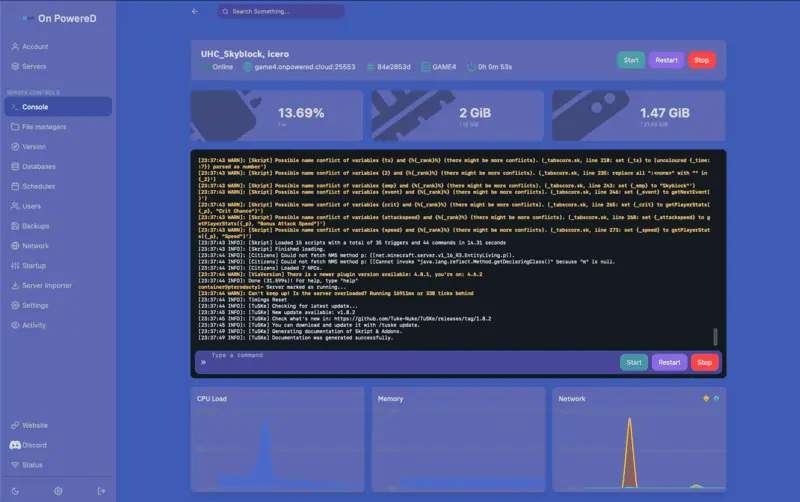
Run your Terraria world from the panel
The world is set in the startup variables: name, size (1, 2, 3), difficulty (0 to 3), password, MOTD. With TShock, configuration lives in tshock/config.json.
The Stop button sends exit, which saves the world before shutting down. Files go through SFTP or the file manager.
Included with every plan
Variables
World name and size, difficulty, password, MOTD, without editing a file.
SFTP
Upload your .tmod files, your TShock plugins or an existing .wld world.
Backups
3 to 5 depending on the plan, to create, restore or download from the panel.
Schedules
Run save every 15 minutes: a forced stop then costs you a quarter of an hour at most.
Console
Server commands live, and the TShock /setup code on first start.
Anti-DDoS
Included on every plan, even when the IP gets shared on Discord.

Hosted in Brussels
The servers are in Brussels, so ping stays low from Belgium, the Netherlands and northern France.
OnPowered SRL is a Belgian company: pay with Bancontact, card or PayPal, get an invoice with Belgian VAT, and talk to support in English, French or Dutch, by ticket or on Discord.
All our products